SMS Opt-In and Message Flow
Lead Net uses a private, owner-configured SMS workflow for internal business notifications. The only outbound recipient is a mobile number owned and controlled by the Lead Net account owner.
How the recipient opts in
- The Lead Net account owner manually enters their personal mobile number into the Twilio Studio workflow.
- The owner verifies that they control the destination number.
- Before activating the workflow, the owner authorizes Lead Net to send internal notifications containing the sender number and message body of inbound SMS messages received by the Lead Net business number.
- The owner is informed that message frequency varies, message and data rates may apply, and STOP, START, and HELP commands are available.
Message flow
- An individual sends an inbound SMS to the Lead Net Twilio number.
- The Twilio Studio workflow receives the inbound message.
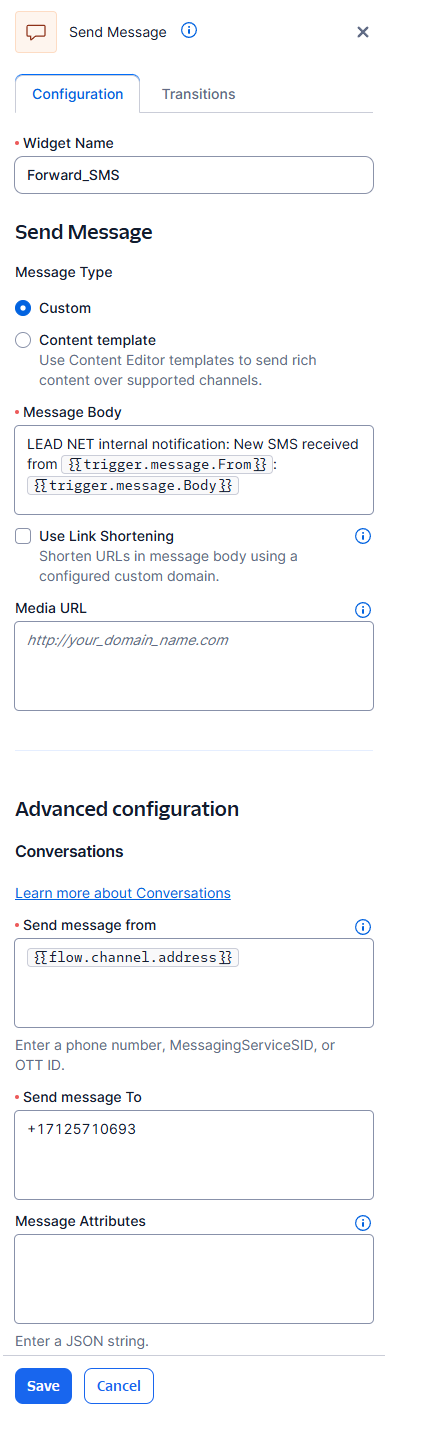
- The workflow sends an internal notification to the single preconfigured owner-controlled mobile number.
- No automated reply is sent to the original inbound sender through this campaign.
Configuration evidence
The screenshot below shows the private workflow configuration used to designate the sole outbound recipient. Account credentials and other sensitive information should be obscured before publication.
Opt-out and assistance
The owner may reply STOP to stop notifications, START to resume, or HELP for assistance. The owner may also disable the Studio workflow or remove the destination number.
Program disclosures
Message frequency varies according to inbound SMS volume. Message and data rates may apply. Participation is voluntary and is not a condition of purchasing goods or services. See the SMS Terms and Conditions and Privacy Policy.
Contact
Questions may be sent to support@aiworkstack.tech or directed to +1 712-571-0693.